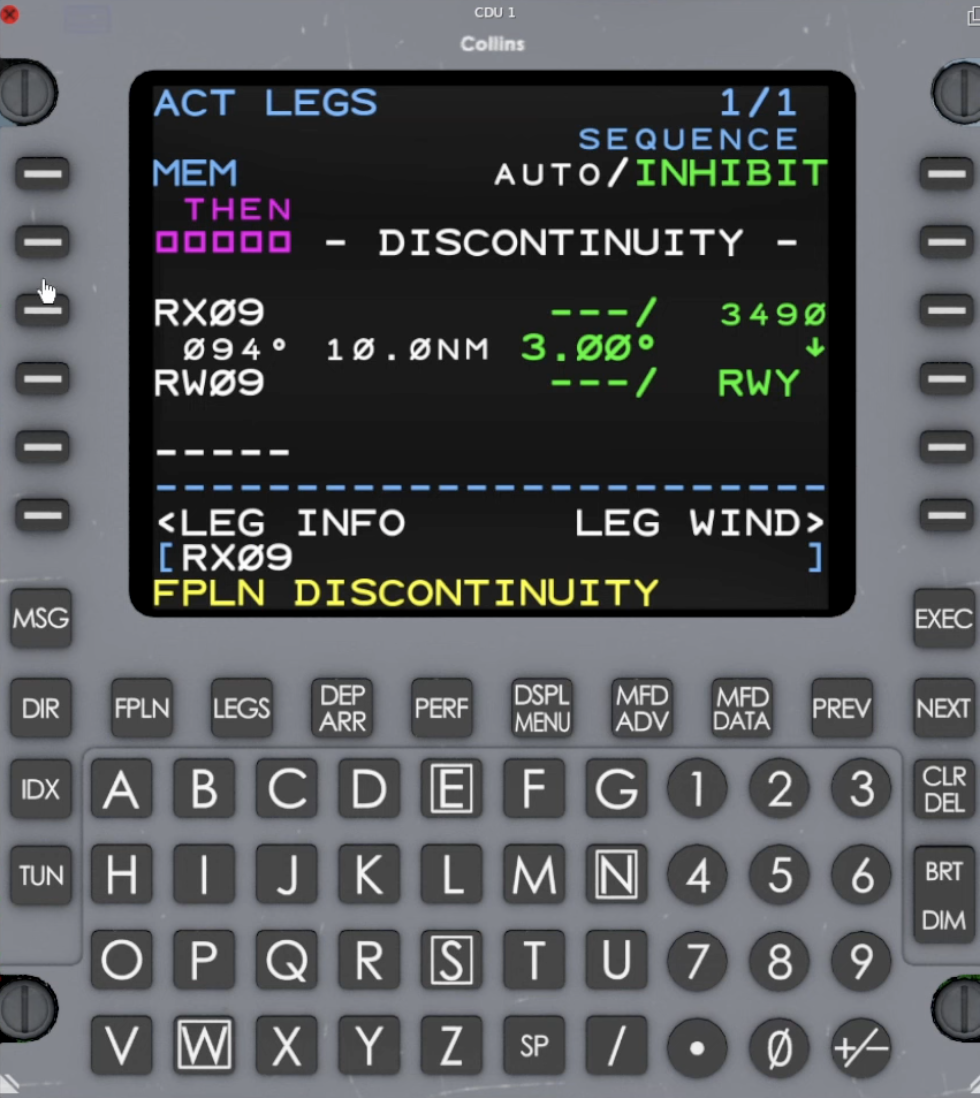
Before loading a visual, assume the following basic setup:
- The destination airport is already in the active flight plan and set as DEST on the FMS.
- The FMS is the selected lateral nav source on the PFD (FMS1/FMS2 as applicable) and the aircraft is navigating normally in LNAV along the route.
Step‑by‑step: database visual approach (simplest method)
- On the CDU, press DEP/ARR to open the Departures/Arrivals page for your destination.
- If you see departures, press DEP/ARR again until you see ARR for DEST at the top of the page.
- On the ARRivals page, select ARRIVE for your destination airport if prompted.
- In the list of approaches, scroll down until you see the VISUAL approaches at the end of the list.
- Line‑select the VISUAL RWxx you want (for example, VISUAL RWY 34).
- On the next page, check the RX (runway extension) distance in NM from the threshold (default is usually 5 NM).
- If you want a different length final, type the new distance in NM in the scratchpad and line‑select it into the RX field.
- Press LEGS and make sure the route flows from your last fix to RXxx, then to the runway, with no discontinuity you don’t want.
- If there is a DISCONTINUITY, line‑select the next waypoint (for example, RXxx) over the discontinuity to close it.
- When the path looks correct, press EXEC to activate the visual approach.
- Verify on the MFD that you see the extended runway centerline from RXxx to the runway.
References
Sim video:
Hot Start Challenger 650 Collins Pro Line 21 FMS Basic & Advanced Procedures
Flight Management System
FMS-3000 operator’s guide (Page 524)